As people around the world are staying at home due to COVID-19, many are turning to new apps and communications tools to work, learn, access information, and stay connected with loved ones.
While these digital platforms are helpful in our daily lives, they can also introduce new online security risks. Our Threat Analysis Group continually monitors for sophisticated, government-backed hacking activity and is seeing new COVID-19 messaging used in attacks, and our security systems have detected a range of new scams such as phishing emails posing as messages from charities and NGOs battling COVID-19, directions from “administrators” to employees working from home, and even notices spoofing healthcare providers. Our systems have also spotted malware-laden sites that pose as sign-in pages for popular social media accounts, health organizations, and even official coronavirus maps. During the past couple of weeks, our advanced, machine-learning classifiers have seen 18 million daily malware and phishing attempts related to COVID-19, in addition to more than 240 million COVID-related spam messages.
To protect you from these risks, we've built advanced security protections into Google products to automatically identify and stop threats before they ever reach you. Our machine learning models in Gmail already detect and block more than 99.9 percent of spam, phishing and malware. Our built-in security also protects you by alerting you before you enter fraudulent websites, scanning apps in Google Play before you download, and more. But we want to help you stay secure everywhere online, not just on our products, so we’re providing these simple tips, tools and resources.
Know how to spot and avoid COVID-19 scams
With many of the COVID-19 related scams coming in the form of phishing emails, it’s important to pause and evaluate any COVID-19 email before clicking any links or taking other action. Be wary of requests for personal information such as your home address or bank details. Fake links often imitate established websites by adding extra words or letters to them—check the URL’s validity by hovering over it (on desktop) or with a long press (on mobile). Keep these tips handy and learn more at g.co/covidsecuritytips.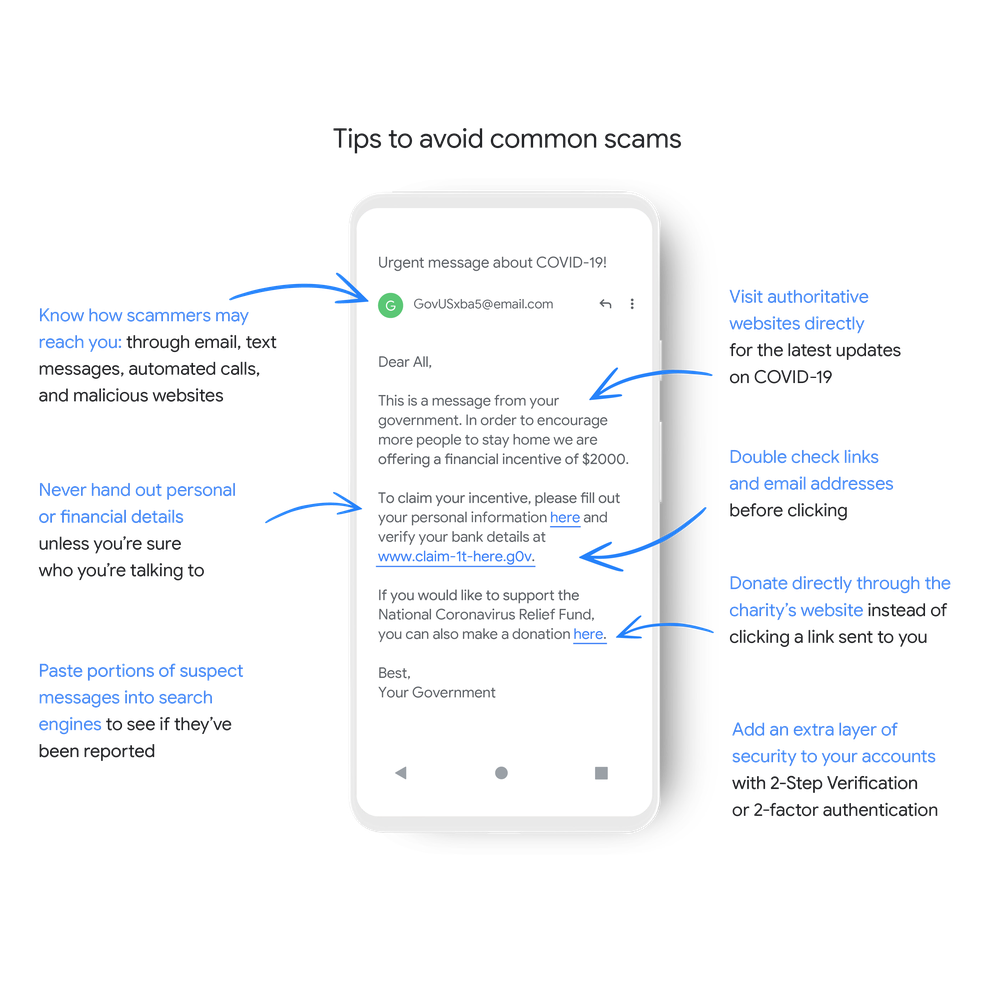
Use your company’s enterprise email account for anything work-related
Working with our enterprise customers, we see how employees can put their company’s business at risk when using their personal accounts or devices. Even when working from home, it’s important to keep your work and personal email separate. Enterprise accounts offer additional security features that keep your company’s private information private. If you’re unsure about your company’s online security safeguards, check with your IT professionals to ensure the right security features are enabled, like two-factor authentication.
Secure your video calls on video conferencing apps
The security controls built into Google Meet are turned on by default, so that in most cases, organizations and users are automatically protected. But there are steps you can take on any video conferencing app to make your call more secure:
-
If your meetings use short, numeric codes, turn on the password or PIN feature. The extra layer of verification will help ensure only the invited attendees gain access to the meeting.
-
When sharing a meeting invite publicly, be sure to enable the “knocking” feature so that the meeting organizer can personally vet and accept new attendees before they enter the meeting.
-
If you receive a meeting invite that requires installing a new video-conferencing app, always be sure to verify the invitation—paying special attention to potential imposters—before installing.
Install security updates when notified
When working from home, your work computer may not automatically update your security technology as it would when in the office and connected to your corporate network. It’s important to take immediate action on any security update prompts. These updates solve for known security vulnerabilities, which attackers are actively seeking out and exploiting.
Use a password manager to create and store strong passwords
With all the new applications and services you might be using for work and school purposes, it can be tempting to use just one password for all. In fact, 66 percent of Americans admit to using the same password across multiple accounts. To keep your private information private, always use unique, hard-to-guess passwords. A password manager, like the one built into Android, Chrome, and your Google Account can help make this easier.Protect your Google Account
If you use a Google Account, you can easily review any recent security issues and get personalized recommendations to help protect your data and devices with the Security Checkup. Within this tool, you can also run a Password Checkup to learn if any of your saved passwords for third party sites or accounts have been compromised and then easily change them if needed.
You should also consider adding two-step verification (also known as two-factor authentication), which you likely already have in place for online banking and other similar services to provide an extra layer of security. This helps keep out anyone who shouldn’t have access to your accounts by requiring a secondary factor on top of your username and password to sign in. To set this up for your Google Account, go to g.co/2SV. And if you’re someone who is at risk of a targeted attack—like a journalist, activist, politician or a high profile healthcare professional—enroll in the Advanced Protection Program, our strongest security offering, at g.co/advancedprotection.
Help your kids stay safe online
With schools closed around the world, kids are online more than ever before. You can help your kids learn how to spot scams with the educational material at Be Internet Awesome and within the interactive learning game, Interland. You can also use Family Link to create age-appropriate accounts, control your kids’ app downloads, and monitor their activity.
Our teams continue to monitor the evolving online security threats connected to COVID-19 so that we can keep you informed and protected. For more tips to help you improve your online security, visit our Safety Center.by Mark Risher via The Keyword

0 komentar:
Post a Comment